
If you ask ten agencies what web development includes, you may get ten different answers. Some will talk about code. Others will talk about design, hosting, SEO, or conversion strategy. In 2026, the honest answer is broader than most business owners expect: web development includes every technical, strategic, and operational step required to turn a website into a reliable growth asset.
That matters because a website is no longer just a digital brochure. It is often your first sales conversation, your lead capture engine, your hiring tool, your credibility check, and your analytics hub. A modern web development project should account for all of that from the beginning, not bolt it on after launch.
Below is a practical breakdown of what web development really includes in 2026, especially for businesses planning a new site, a rebuild, or a serious upgrade.
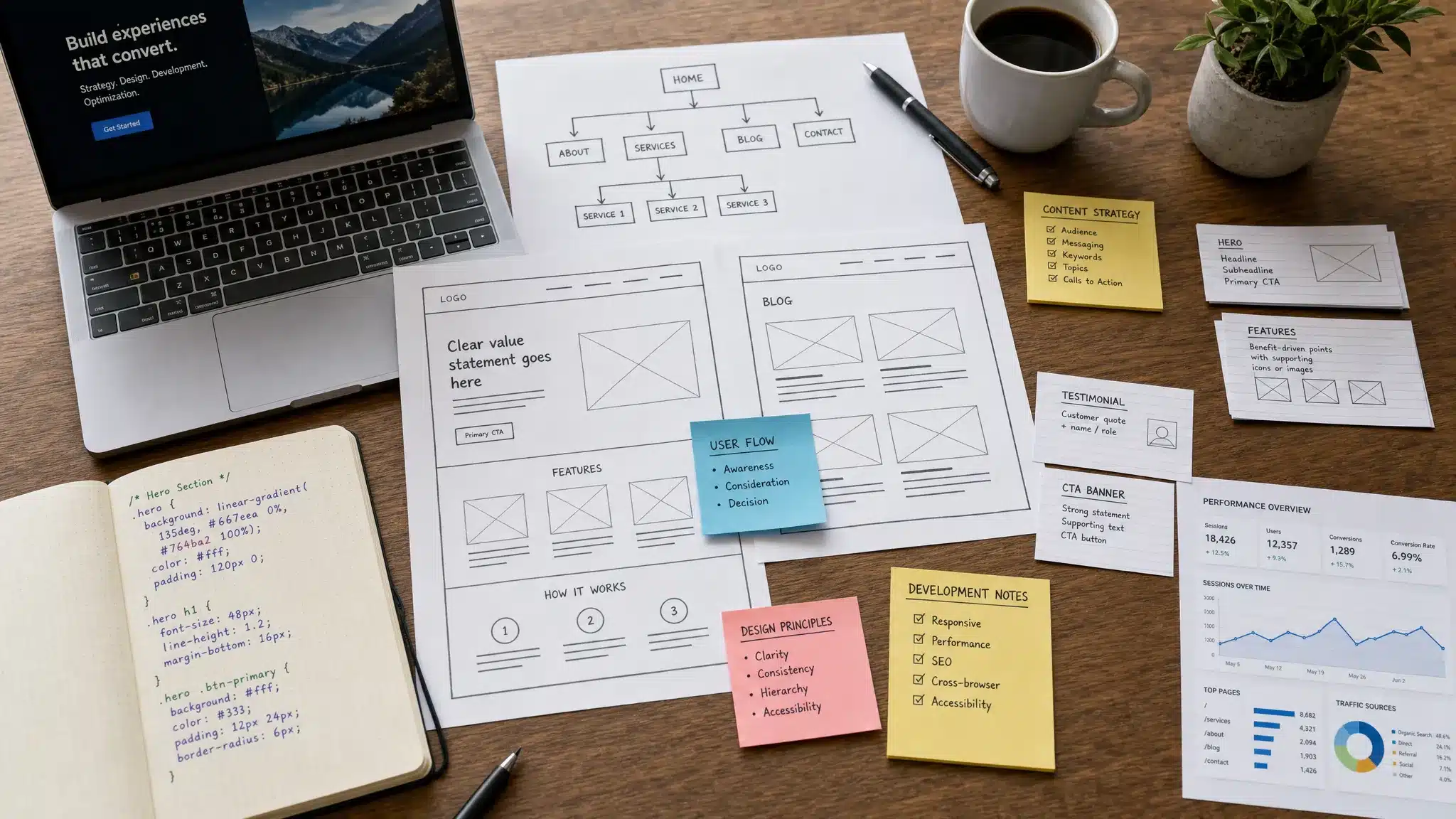
Web development starts before anyone writes code
The biggest misconception about web development is that it begins when a developer opens a code editor. In a professional project, it starts much earlier with discovery and planning.
Before choosing a platform or designing pages, a team needs to understand the business goal. Is the website meant to generate qualified leads, sell products, book appointments, support an existing sales team, or improve brand trust? A local service business, a SaaS company, and an e-commerce brand all need different site structures, user journeys, and technical priorities.
This early stage usually includes audience research, competitor review, content planning, conversion goals, technical requirements, and SEO considerations. Without this foundation, even a beautiful website can miss the mark.
A good web development process should answer questions like:
- Who are the primary users, and what do they need to do on the site?
- What actions should visitors take, such as requesting a quote, booking a call, purchasing, or subscribing?
- What pages are needed for trust, search visibility, and conversion?
- What tools must connect to the website, such as CRM, email marketing, analytics, payment systems, or booking software?
- What performance, accessibility, and security standards must the site meet?
This is why web development in 2026 is not only a technical service. It is a business process that connects strategy, design, code, content, and growth.
The main parts of modern web development
At a high level, web development includes several disciplines that work together. Some projects need all of them, while smaller websites may only need a leaner version.
| Web development area | What it includes | Why it matters |
|---|---|---|
| Strategy and planning | Goals, audience, sitemap, functionality, platform choice | Prevents wasted budget and unclear scope |
| UI/UX design | Layouts, navigation, user flows, accessibility, mobile experience | Helps visitors understand and act quickly |
| Front-end development | HTML, CSS, JavaScript, responsive interfaces | Turns designs into usable website pages |
| Back-end development | Databases, server logic, APIs, CMS configuration | Powers dynamic features and content management |
| CMS development | WordPress, Webflow, or custom content structures | Helps teams update content without developers |
| SEO setup | Technical SEO, metadata, schema, indexability, internal structure | Supports search visibility from launch |
| Performance optimization | Core Web Vitals, image compression, caching, clean code | Improves user experience and conversion rates |
| Security | Updates, permissions, backups, SSL, monitoring | Reduces business risk and downtime |
| Testing and launch | QA, browser testing, redirects, analytics, deployment | Prevents costly errors when the site goes live |
| Ongoing improvement | Maintenance, analytics, CRO, new pages, SEO growth | Keeps the site competitive after launch |
This table also explains why a cheap “website build” can become expensive later. If important pieces are skipped, businesses often pay for fixes after traffic, rankings, or leads start suffering.
Strategy, sitemap, and information architecture
Information architecture is the structure of your website. It defines how pages are organized, how navigation works, and how users move from first visit to conversion.
In 2026, this step is especially important because users are impatient and search engines rely heavily on clear site structure. If your services are buried, your calls to action are unclear, or your content overlaps, both people and search engines struggle to understand the site.
A strong information architecture typically includes a clear homepage, service or product pages, proof pages such as case studies or testimonials, educational content, contact or booking paths, and legal or support pages when needed. For SEO, it should also group related topics logically so your website can build topical authority over time.
For businesses redesigning an existing website, this stage should include a content and URL audit. Removing or renaming pages without planning redirects can damage rankings. If you are already thinking about a larger refresh, WebHivez has a detailed website redesign checklist for 2026 that covers the planning steps in more depth.
UI and UX design are now part of development quality
Web design and web development are different disciplines, but they are deeply connected. In 2026, a site cannot be considered well developed if the user experience is confusing, slow, or inaccessible.
UI, or user interface design, focuses on the visual layer: colors, typography, spacing, buttons, imagery, and page layouts. UX, or user experience design, focuses on how easily people can complete tasks. A good UX flow helps visitors find answers, compare options, trust the business, and take the next step.
For business websites, UX is not just about looking modern. It influences lead quality and conversion. A page with vague messaging, weak hierarchy, or too many competing calls to action can lose visitors even if the code is technically correct.
Modern UI/UX work often includes mobile-first layouts, accessible contrast, clear navigation, scannable page sections, trust signals, and conversion-focused page structure. If you want to understand where design is heading this year, the WebHivez guide to UI/UX design trends for 2026 is a useful companion to this topic.
Front-end development: what users see and interact with
Front-end development turns approved designs into the website interface people use in a browser. It includes the structure, styling, animations, forms, menus, responsive behavior, and interactive elements.
The front end must work across screen sizes and browsers. It also needs to be fast, accessible, and easy to maintain. This is where HTML, CSS, and JavaScript come into play, along with frameworks or libraries when the project requires them.
In 2026, front-end development is not about adding flashy effects for the sake of it. The priority is clarity, speed, and usability. Motion can help guide attention, but excessive animations can slow pages and distract users. The best front-end work feels smooth because it removes friction.
This is also where accessibility becomes practical. Buttons need readable labels. Forms need clear errors. Menus need keyboard support. Text needs enough contrast. These details affect real users, and they can also reduce legal and reputational risk. The W3C Web Content Accessibility Guidelines remain the global reference point for accessible web experiences.
Back-end development: what powers the site behind the scenes
Back-end development handles the systems that users do not directly see. This can include databases, content management, server logic, authentication, API connections, e-commerce functionality, user accounts, search features, and custom business workflows.
For many business websites, the back end is built around a CMS like WordPress or a platform like Webflow. For more complex applications, it may involve custom development, cloud infrastructure, or deeper integrations.
Back-end quality affects reliability. If the site has messy database structures, poorly configured plugins, weak permissions, or unstable integrations, the front-end experience can break. Strong back-end development keeps the website manageable, secure, and scalable as the business grows.
For a deeper explanation of development roles, including front-end, back-end, and full-stack work, WebHivez has a related guide on what a web developer actually does.
CMS development: making the website manageable
A business website should not require a developer for every small content update. That is why CMS planning is a major part of web development.
CMS development includes setting up page templates, reusable sections, custom fields, blog structures, media handling, menus, permissions, and editing workflows. The goal is to give your team control without creating chaos.
For example, a service business may need editable service pages, location pages, testimonials, FAQs, and blog posts. An agency or consultant may need case studies and portfolio entries. An e-commerce business may need product categories, filters, inventory fields, and checkout settings.
Good CMS development balances flexibility with consistency. If everything is too locked down, your team cannot move quickly. If everything is too open, pages become inconsistent and hard to maintain.
Technical SEO is part of the build, not an afterthought
SEO should not begin after launch. By then, important architecture decisions have already been made.
Technical SEO in web development includes clean URL structures, crawlable navigation, metadata, heading hierarchy, XML sitemaps, robots.txt configuration, canonical tags, schema markup, image optimization, redirect planning, and indexation controls. It also includes making sure search engines can access important content.
Google’s own documentation on Search Essentials makes it clear that technical accessibility, useful content, and crawlability all matter. A site can have excellent copy and still underperform if search engines cannot understand or index it properly.
For businesses, technical SEO protects the investment. If your website is designed beautifully but launches with duplicate pages, broken redirects, slow templates, or poor mobile rendering, rankings and leads can suffer.
This is especially important during redesigns or platform migrations. Changing URLs, removing pages, or altering content without an SEO plan can erase years of search equity.
Performance and Core Web Vitals
Page speed is no longer a nice-to-have. Users expect fast websites, and slow experiences can reduce conversions. Performance is also connected to Google’s Core Web Vitals, which measure real-world user experience factors such as loading speed, interactivity, and visual stability.
The main performance work in web development often includes compressing images, reducing unnecessary scripts, using caching, improving server response times, loading assets efficiently, and avoiding layout shifts. On CMS sites, it may also include plugin review and database cleanup.
Performance is not only technical. Design decisions affect speed too. Oversized images, heavy video backgrounds, too many third-party scripts, and complex animations can all slow a site. That is why developers, designers, content teams, and marketers need to work together.
A fast website feels more professional. It can also help paid traffic perform better because every click has a better chance of converting.
Security, backups, and maintenance
Security is a core part of web development because websites are business infrastructure. A compromised site can lead to downtime, data exposure, SEO spam, customer distrust, and lost revenue.
Security work may include SSL configuration, secure hosting setup, user role management, plugin and theme updates, malware scanning, firewalls, backup systems, form protection, and safe deployment practices. For WordPress websites, update discipline is especially important because outdated plugins and themes are common risk points.
The OWASP Top 10 is a widely recognized resource for understanding common web application security risks. Not every business website needs enterprise-level security engineering, but every site needs sensible protection.
WebHivez also covers practical steps in its guide to website security best practices for 2026, including why prevention is usually cheaper than emergency recovery.
Integrations and automation
Modern websites rarely stand alone. They connect with the tools a business already uses.
Common web development integrations include analytics platforms, CRM systems, email marketing tools, payment processors, booking systems, live chat, customer support software, inventory tools, and advertising pixels. These integrations help the website become part of the business workflow instead of a separate marketing asset.
The key is to integrate only what is useful. Too many scripts and tools can slow down the site, create privacy issues, and make troubleshooting harder. A professional development process should evaluate each integration for business value, performance impact, data privacy, and long-term maintainability.
This is also where automation can help. For example, form submissions can route to a CRM, new leads can trigger email workflows, and appointment bookings can sync with a calendar. When done well, integrations reduce manual work and improve response time.
Content implementation and on-page quality
Web development also includes bringing content into the site properly. That does not mean simply pasting text into pages. Content needs structure, formatting, internal links, optimized images, headings, calls to action, and metadata.
A well-developed page should be easy to scan. Visitors should quickly understand who the page is for, what problem it solves, why the business is credible, and what to do next. This is especially important on service pages, landing pages, and homepages.
Content quality also affects SEO. Search engines need clear signals about page topics. Users need helpful information. A page that is thin, generic, or poorly structured will have a harder time competing, even if the design looks good.
In 2026, many teams use AI to support content planning, drafting, image creation, and optimization. But AI should not replace human strategy. The best results come from combining AI efficiency with real business insight, original examples, and expert review.
Testing and quality assurance
Before launch, a website should go through quality assurance. This is where the team checks whether everything works as expected.
Testing often includes mobile responsiveness, browser compatibility, form submissions, checkout flows, page speed, broken links, redirects, accessibility basics, analytics tracking, security settings, and CMS editing. For larger sites, QA may also involve staging environments, user acceptance testing, and regression testing.
Skipping QA is risky. A broken contact form, missing tracking code, or incorrect redirect can quietly cost leads for weeks. Launch pressure is real, but a structured testing process protects the business from avoidable problems.
Launch is a process, not a single button
Launching a website is more than making it live. A professional launch includes domain and DNS setup, hosting checks, SSL verification, redirects, sitemap submission, analytics validation, backup creation, final crawl checks, and monitoring after deployment.
For existing websites, launch planning is even more important. The team needs to preserve SEO value, avoid broken links, and confirm that important pages remain accessible. A launch should also include a rollback plan in case something unexpected happens.
After launch, the first few days are critical. Forms, analytics, indexing, speed, and uptime should be watched closely. Small issues are normal, but they should be found quickly.
Post-launch growth and optimization
A website is never truly finished. Markets change, competitors improve, search behavior evolves, and user expectations rise. The best websites improve over time.
Post-launch web development may include adding new landing pages, improving conversion rates, publishing SEO content, updating plugins, refining page speed, adjusting forms, reviewing analytics, and testing new calls to action.
This is where the website shifts from a project to an asset. A strong launch gives you a foundation. Ongoing optimization turns that foundation into measurable growth.
What web development should include in your project scope
When comparing proposals, look beyond the number of pages. A proper web development scope should clarify what is included before, during, and after the build.
Here are the areas worth confirming:
- Strategy, sitemap, and page planning
- UI/UX design and responsive layouts
- Front-end and back-end development
- CMS setup and editing capabilities
- Technical SEO foundations
- Page speed optimization
- Security setup and backup planning
- Integrations with business tools
- QA, launch support, and post-launch monitoring
- Maintenance or growth support after launch
The right scope depends on your goals. A five-page brochure site does not need the same level of architecture as a national e-commerce platform. But every serious business website should include strategy, usability, performance, SEO, security, and a clean launch process.
Build a website that is more than “just a site”
Web development in 2026 includes strategy, design, code, SEO, performance, security, integrations, testing, launch, and ongoing growth. When these pieces work together, your website becomes a stronger business asset.
If you are planning a new website or considering a rebuild, WebHivez can help you create a high-performing WordPress or Webflow website built around usability, SEO, and lead generation. Start with a free audit and find out what your current site needs to perform better.
Frequently Asked Questions (FAQs)
Is web development the same as web design?
No. Web design focuses on the visual experience and usability, while web development turns that experience into a working website. In modern projects, the two overlap because design decisions affect speed, accessibility, SEO, and conversion.
Does web development include SEO?
It should include technical SEO foundations such as crawlability, site structure, metadata, redirects, schema where appropriate, and performance. Ongoing content strategy and link building are usually separate SEO services, but the build must support them.
Does every business need custom web development?
Not always. Some small businesses can start with a well-built CMS website using proven structures. Custom development becomes more important when you need unique workflows, integrations, advanced functionality, or a highly differentiated brand experience.
How long does a web development project take in 2026?
Timelines vary based on scope, content readiness, features, approvals, and integrations. A simple business website may take weeks, while complex custom sites, e-commerce builds, or migrations can take several months.
What should I prepare before hiring a web development agency?
Prepare your business goals, target audience, must-have pages, example websites you like, brand assets, content status, required integrations, and any current website data. Clear inputs help the agency estimate scope and avoid delays.