Good ecommerce web design in 2027 starts with speed clear product pages and a short checkout. Looks come last. If you run a small or mid sized store a fast Shopify or WooCommerce build with clean product pages is the best starting point. Larger catalogs and wholesale stores will do better with a custom or headless setup.
Most stores lose sales for boring reasons. Pages load slowly. Buttons are hard to tap. Checkout asks for too much. After a short definition the post covers ten design trends that fix those problems and prepare you for AI search. The later sections help you pick a platform adapt to your niche and choose an agency.
What Is E-commerce Web Design (and What Changes in 2027)
Ecommerce web design is the planning and building of an online store so people can find products trust the brand and pay without friction. It covers layout product pages, search, cart, checkout and the code behind them.
An ecommerce platform is the software that runs your store. It handles the catalog, cart, payments and orders. Design sits on top and decides how easy all of that feels to a shopper. Good ecommerce functionality goes further. It includes filters that work on a phone, saved carts, order tracking and fast search.
So what’s different in 2027? Two things. Some shoppers now start product research in AI search tools. And some AI agents can compare products and complete purchases for the user. Your store has to work for people and for machines.

Performance First Design: Core Web Vitals for Online Stores
Trend 1. Treat speed as a design feature not a developer task.
A good ecommerce website feels instant. Google’s Core Web Vitals give you the targets. Aim for Largest Contentful Paint under 2.5 seconds. Keep Interaction to Next Paint under 200 milliseconds. Keep Cumulative Layout Shift under 0.1.
Honestly, speed fixes are often the cheapest way to increase online sales. Many of them don’t need a redesign.
Google judges these scores at the 75th percentile of real visits. So check field data in Search Console, not just one lab test. A common example is a product page with an oversized hero photo. Compress it serve it as WebP or AVIF and set its width and height. That one fix can help both LCP and layout shift.
Start here:
- Serve images in AVIF or WebP and use lazy loading below the fold
- Put a CDN in front of the store
- Cut apps and scripts you don’t use
- Reserve space for images and banners so nothing jumps
- Use prerendering or speculation rules so the next page opens fast
Page speed also helps green UX. Lighter pages use less data and less energy.
Accessibility Is Now a Baseline (WCAG 2.2 + European Accessibility Act)
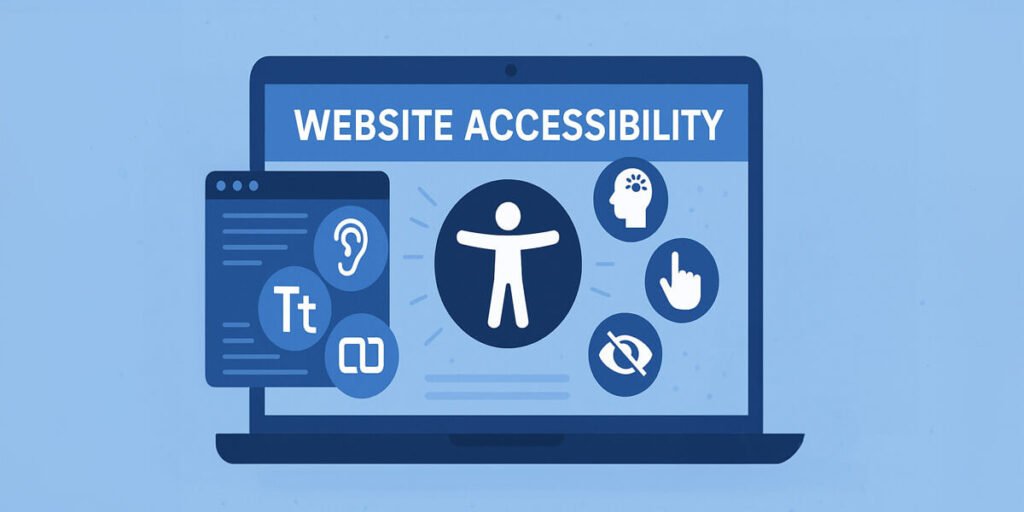
Trend 2. Accessibility is now part of the brief not an extra.
The European Accessibility Act has applied since 28 June 2025. It covers online stores that sell to EU customers. In the US, online stores have faced accessibility claims under the ADA. Some very small businesses are exempt from the EU rules so check with a legal adviser how they apply to you.
If you hire ecommerce UI/UX experts, ask how they test for WCAG 2.2. The basics are simple. Use high contrast text. Show clear focus states. Make tap targets at least 24 by 24 CSS pixels which is the WCAG 2.2 minimum. Write real alt text. Respect reduced motion settings. Test with a screen reader.
Try a quick test. Tab through your checkout using only a keyboard. If you can’t see where the focus is or can’t reach the pay button fix that first.
Accessible stores are easier for everyone to use. Older shoppers and people on bright phone screens benefit too. You can also see how a UX led build works on our UI UX design page.
Product Pages That Convert
Trend 3. Build product pages around answers and trust.
The product page is where the sale happens. Keep the layout simple. Show the price, the main photo, the buy button and the delivery estimate above the fold on mobile.
Copywriting for ecommerce should answer the questions a buyer would ask in a shop. What’s it made of? Does it fit? How long does delivery take? Skip filler like “premium quality.” Say what the thing does.
Here’s a simple before and after using made up specs. A weak line says “Premium quality cotton tee.” A better one says “100% cotton, 180 gram, true to size, ships in 2 to 4 days free returns within 30 days.” The second one answers what a buyer actually asks.
Apparel ecommerce best practices are easy to follow:
- Add a size guide next to the size picker
- Show real fit notes from reviews
- Use photos on different body types
- Show the return policy right under the buy button
Trust signals matter here. Put reviews, secure payment icons and a clear return policy on the page not buried in the footer.
Shopping Cart and Checkout Design
Trend 4. Make checkout shorter and more flexible.
Baymard Institute puts average cart abandonment near 70 percent. Checkout design is where you win that back.
Offer guest checkout. Don’t force an account before payment. Add digital wallets like Apple Pay and Google Pay. Connect a payment gateway such as Stripe or PayPal. Buy now pay later (BNPL) options can help on higher priced items so test them before you commit. Show shipping costs early and if you offer a free shipping threshold display progress toward it in the cart.
Shopping cart templates can save time but pick one you can edit. A rigid template becomes a problem the first time you need a custom rule.
Here’s how the main cart types compare:
| Cart type | Best for | Watch out for |
|---|---|---|
| Hosted cart software | Small stores that want fast setup | Limited design control |
| Subscription shopping cart | Replenishment and membership products | Needs clear cancel and pause options |
| Embeddable shopping cart | Adding a buy button to an existing site | Styling and tracking can be tricky |
| Custom cart | Complex pricing and B2B | Higher build cost |
When you compare the best online shopping cart software test it on a phone first. Then check abandoned cart emails and order tracking. Both are easy to skip during a build and annoying to add later.
Designing for AI Search and Shopping Agents
Trend 5. Make product data easy for AI agents to read.
Agentic commerce means an AI agent shops on the buyer’s behalf. It reads your product data compares options and in some cases completes the purchase. If key details sit only inside images or heavy scripts an agent may miss them. Put the basics in plain text.
Clean markup helps here. Use semantic HTML. Keep price stock and shipping as plain text. Add product schema markup. Keep your product feed clean in Google Merchant Center. Standards for agent shopping such as the Universal Commerce Protocol are still taking shape. Check each platform’s documentation before building around one.
AEO (answer engine optimization) and GEO (generative engine optimization) both come down to writing clear answers. Put short direct facts on the page like material, size, delivery time and return terms. Our guide on AI search optimization covers crawler controls and what to allow.
SEO-Friendly E-commerce Design
Trend 6. Build a store search engines can crawl cleanly.
Ranking starts with structure. If you’re wondering how to rank for ecommerce begin with clean URLs one H1 per page and category pages that have real text. Internal links should connect categories products and guides.
How to improve rank for ecommerce stores that are already live? Fix duplicate pages from filters. Merge thin product pages. Add helpful buying guides. Use structured data on every product.
For example a filter URL like /shoes?color=black&size=9 can create many near duplicate pages. Use canonical tags and keep useless filter combinations out of the index.
Some owners want done for you ecommerce SEO. That’s fine if the team shares monthly reports and fixes technical problems first. If they only talk about links be careful. Our search engine optimization service includes technical audits for this reason.

Visual Trends: Bento Grids, Dark Mode, Micro-interactions
Visual trends are fun but they should help people buy. Here’s my honest take on the main ones.
Bento grids (trend 7) work well for category pages and homepages. They let you show several collections in one clean block.
Dark mode isn’t one of the ten but it’s worth testing if your customers browse in low light. Check contrast on product photos and buttons first.
Micro-interactions (trend 8) like a button that confirms “added to cart” can reduce doubt. Keep them quick. Scroll triggered animation and view transitions can look great but heavy motion can hurt INP and annoy people who use reduced motion settings. Variable fonts and container queries are quieter upgrades. They let one layout adapt to many screens with less code.
Glassmorphism is overrated. It looks good in mockups but blurred see through panels can fail contrast checks over real product photos.
If you want a custom ecommerce web site with its own look plan the design system before the visuals. Mobile first design is still the right start.
No visual trend lifts sales on its own. Change one thing at a time and watch your add to cart rate.
Personalization and Conversational Shopping
Trend 9. Personalize with simple first party data.
Personalization works best when it’s simple. Show recently viewed items. Suggest add ons in the cart. Send email automation based on first party data like past orders and browsing.
Trend 10. Add conversational shopping.
More stores are adding conversational UI. A chat assistant that answers sizing and delivery questions can cut support tickets. Some stores also add AR previews for furniture and eyewear.
You need data to know what works. Set up GA4 and Google Tag Manager early. Track revenue per visitor, add to cart rate and where people leave checkout. To see whether visitors actually engage, read our guide on what a sticky website is.
Our article on ecommerce UX trends for 2027 goes deeper on agentic commerce and conversion fixes.
Custom vs Platform: Which E-commerce Setup Fits You?
This choice shapes your costs for years so it’s worth slowing down. Here’s the short version.
| Option | Best for | Trade off |
|---|---|---|
| Shopify | Fast launch, simple catalogs | Monthly fees and app costs |
| WooCommerce | Content heavy stores on WordPress | Needs hosting and upkeep |
| Magento | Large catalogs with complex rules | Needs more development resources |
| Opensource ecommerce like Medusa | Teams that want headless control | Needs developers |
| Bespoke ecommerce solutions | Unique workflows and integrations | Highest upfront cost |
Cost usually comes from five places. These are platform and app fees, custom features, connections to your inventory systems product photography and content and ongoing maintenance. Ask every quote to break these out. Plans and pricing change often so check each platform’s current pricing.
If you’re comparing the best ecommerce platforms ask three questions. How many products do you have? Who will manage the store daily? What must it connect to?
Affordable ecommerce development usually means a theme based build with a few custom touches. That’s enough for most new stores. Choose a bespoke ecommerce website when your pricing bundles or ordering rules don’t fit a template.
An all in one ecommerce solution is easier to run. A headless commerce setup can be faster and more flexible but you’ll need a developer. Replatforming later is possible but takes planning so choose with your next three years in mind.
For WordPress based stores see our WordPress development service.
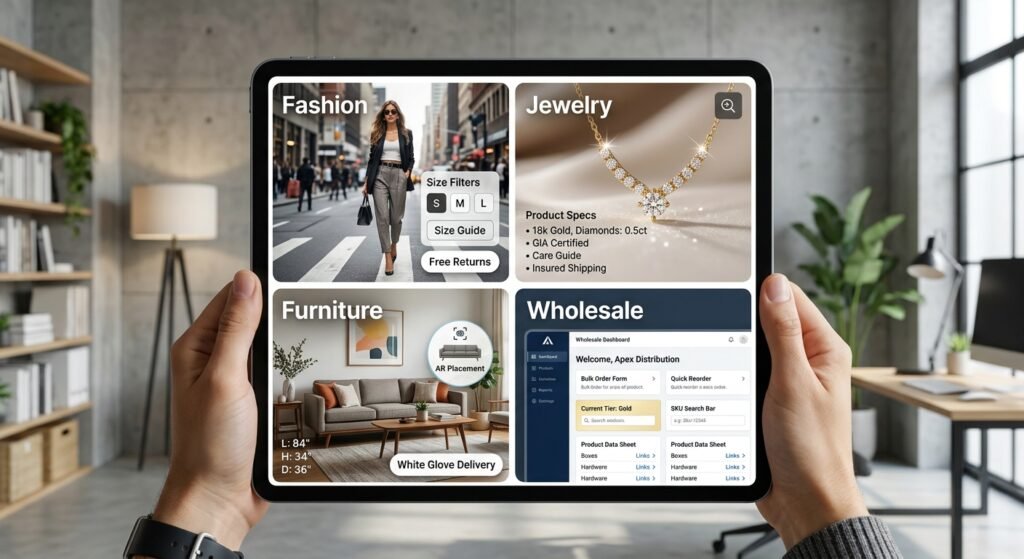
Design Tips by Niche: Fashion, Jewelry, Furniture, Wholesale
Each niche sells differently. Here’s what matters most.
Fashion. If you want to create a website for clothing put filters size guides and returns first. Show models in real settings.
Jewelry. For jewelry store website development use large zoomable photos material details certificates and clear care and insurance info. Buyers need trust before they spend.
Furniture. Furniture ecommerce web design services should include room photos exact dimensions delivery windows and AR placement. Assembly and shipping details cut returns.
Wholesale. Wholesale ecommerce web design and web design for distribution companies needs login pricing bulk order forms quick reorder and account tiers. Distributors also want clean product data sheets and fast search by SKU.
How to Choose an E-commerce Web Design Company
Choosing the right ecommerce agency takes a bit of homework. Look for a team that shows store results not only pretty screens.
Check these before you sign:
- Live stores in your niche or a similar one
- Core Web Vitals and Lighthouse reports at handoff
- A clear plan for SEO redirects and tracking
- Who you’ll talk to after launch
Watch for red flags too. No live store examples. A quote with no written scope. Guaranteed rankings. No plan for redirects at launch. No support after launch.
An e-commerce website design company handles layout and branding. An e-commerce website development agency also builds the back end integrations and custom features. A boutique web development agency often gives you senior people and closer contact which can suit growing brands. Larger firms bring more capacity for big catalogs.
Ask for scope timeline and ROI targets in writing. WebHivez, for example lists a 95+ PageSpeed score as its standard. See our website design service to learn how we work.
If you already have a store you can request a free audit to see where speed SEO and conversion stand before you plan a rebuild. For custom builds see our custom website development service.
2027 E-commerce Design Checklist
Use this list before you launch or redesign.
- LCP under 2.5 seconds INP under 200 milliseconds CLS under 0.1
- WCAG 2.2 checks done including tap target size and focus states
- Product pages show price delivery and returns above the fold
- Guest checkout wallets and BNPL available
- Product schema and a clean feed in Google Merchant Center
- Semantic HTML and plain text product facts for AI agents
- GA4 and Google Tag Manager tracking purchases and abandoned carts
- Email automation for abandoned carts and post purchase follow up
- Platform choice matches your catalog size and team
- Mobile tested on real phones
Ecommerce web design in 2027 rewards stores that are fast easy to use and easy for machines to read. Pick two or three items from this list and fix them this month. Then measure the result before moving on.
Frequently Asked Questions
What is e-commerce web design?
It’s the process of planning and building an online store so shoppers can browse trust your brand and pay easily. It covers layout, product pages, cart, checkout, speed and SEO.
How much does an e-commerce website cost?
Cost depends on the platform, catalog size, custom features, integrations and ongoing support. A theme based store usually costs less than a bespoke build. Ask for a written scope that breaks these out before you commit.
Which platform is best for an online store?
Shopify suits most small stores that want a quick launch. WooCommerce fits WordPress sites with lots of content. Larger or unusual catalogs may need Magento, Medusa or a custom build.
How long does an e-commerce redesign take?
It depends on scope. A theme refresh takes less time than a custom build or a move to a new platform which adds data migration testing and redirects. Ask your agency for a milestone plan with dates.
What makes a good ecommerce website?
A good ecommerce website loads fast shows clear product details and keeps checkout short. It works well on a phone and is accessible. It’s also easy for search engines and AI tools to read.