
Why Your Website Redesign Brief Is the Most Important Document You’ll Write
Most website redesign projects don’t fail because of bad design. They fail because of a bad brief.
When expectations aren’t clearly defined at the start, you end up in a cycle of revisions, budget overruns, and frustration on both sides of the table. The agency or developer you hired delivers something technically competent, but it doesn’t match what you had in your head. And the reason it doesn’t match is almost always traceable back to a vague, incomplete, or poorly structured redesign brief.
A well-written website redesign brief is your single most powerful tool for getting exactly what you want on time, on budget, and without the back-and-forth chaos that drains everyone’s energy. This guide will walk you through everything you need to include, section by section, so nothing falls through the cracks.
What Is a Website Redesign Brief?
A website redesign brief is a structured document that communicates your goals, requirements, constraints, and expectations to the team handling your redesign. Think of it as a contract of intent it doesn’t replace your actual contract, but it aligns everyone on what success looks like before a single wireframe is drawn.
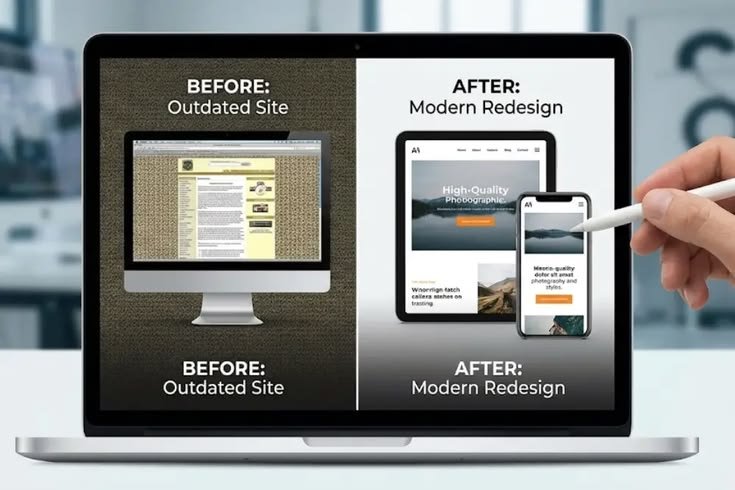
It’s different from a general project brief in that it focuses specifically on what’s changing from your current website, why those changes are needed, and what outcomes you want those changes to produce. Before you even begin writing it, it’s worth understanding whether you need a redesign or a full rebuild because the scope of your brief will differ significantly depending on the answer.
Section 1: Company and Brand Overview
Start with context. Your design or development agency needs to understand who you are, what you do, and who you serve before they can make good decisions about your website.
Include the following in this section:
- Company name and industry
- What you sell or offer be specific about products, services, or both
- Your target audience demographics, psychographics, pain points
- Brand personality and tone formal, friendly, bold, minimal, premium, accessible?
- Key competitors who do you compete with and how do you differentiate?
- Existing brand guidelines if you have a style guide, logo files, or font specifications, attach them here
This section sets the creative foundation. Without it, designers make assumptions and assumptions are expensive.
Section 2: Why You’re Redesigning
Be brutally honest here. Explain what’s wrong with your current website and why the redesign is happening now. Vague answers like “it looks outdated” aren’t useful. Specific answers like “our mobile bounce rate is 74%, our conversion rate is 0.6%, and we haven’t updated the design since 2019” give your agency something concrete to work with.
Common reasons for a redesign include:
- Poor conversion rates or lead generation performance
- Outdated design that no longer reflects the brand
- Poor mobile experience
- Slow page load times hurting SEO and user experience
- A platform migration (e.g., moving to WordPress)
- A business pivot or rebrand
- Difficulty managing content in the existing CMS
If you’re unsure exactly what’s broken, a structured website audit can help you identify the real problems before you brief anyone on a solution.
Section 3: Goals and Success Metrics
What does a successful redesign look like? This is one of the most skipped sections in a brief, and it’s one of the most important. Without measurable goals, there’s no way to evaluate whether the redesign worked.
Define both primary and secondary goals. For example:
- Primary goal: Increase inbound leads by 40% within 6 months of launch
- Secondary goal: Reduce bounce rate from 68% to below 50%
- Secondary goal: Improve Google PageSpeed score from 42 to above 85
- Secondary goal: Reduce time-on-page drop-off on the services section
Quantifiable goals keep everyone accountable including yourself. They also help the agency prioritize decisions when tradeoffs need to be made during the project.
Section 4: Scope of Work
Be explicit about what’s in scope and what’s out of scope. This is where many briefs break down the client assumes certain things are included; the agency assumes they’re not. Spell everything out.
Pages and Structure
List every page that needs to be redesigned. If new pages need to be created, list those separately. A rough sitemap at this stage is incredibly helpful even a bulleted list of pages and their hierarchy is better than nothing.
Common pages to address include:
- Homepage
- About Us page
- Services or product pages
- Contact page
- Blog or resources section
- Landing pages for campaigns or ads
- Legal pages (privacy policy, terms of service)

Functionality Requirements
List any specific features or integrations you need. For example:
- Contact forms with CRM integration
- Live chat or chatbot
- E-commerce functionality
- Booking or appointment scheduling
- Email marketing integrations
- Membership or gated content areas
- Analytics and conversion tracking setup
Content Responsibilities
Clarify who is responsible for writing and supplying content. Will the agency write copy, or are you providing it? Who is responsible for photography, video, and graphics? Content delays are one of the top reasons redesign projects run over schedule establishing this upfront prevents it.
Section 5: Design Direction and Visual Preferences
Design direction is where many clients struggle to communicate clearly. “Modern and clean” means something different to every person in the room. The most effective way to communicate aesthetic preferences is through examples.
Include:
- Inspiration websites list 3 to 5 websites you admire and explain specifically what you like about each one
- Websites to avoid sometimes it’s just as useful to show what you don’t want
- Brand colors hex codes if you have them; general guidance if you don’t
- Typography preferences serif vs. sans-serif, corporate vs. humanist
- Layout preferences image-heavy, text-forward, full-width, boxed, minimal whitespace vs. airy
- Tone of imagery professional stock photos, candid team photography, illustrated, abstract
If you’re redesigning with an eye toward conversion, not just aesthetics, be sure to think carefully about how design decisions affect user behavior. Understanding the principles behind what makes a high-converting website can help you give better design direction that goes beyond surface-level preferences.
Section 6: Technical Requirements
Your technical requirements section should cover platform, hosting, performance expectations, and any existing infrastructure the redesign needs to work with.
Platform and CMS
Specify the platform you want to build on, or ask the agency to recommend one based on your needs. If you’re staying on WordPress, note that. If you’re migrating, explain why and what you’re migrating from. Platform choice has major downstream implications for cost, flexibility, and ongoing maintenance.
Performance Standards
Set baseline expectations for speed and technical performance. Reference specific benchmarks if possible:
- Target Google PageSpeed score (desktop and mobile)
- Core Web Vitals targets
- Mobile-first responsiveness requirements
- Accessibility standards (WCAG 2.1 AA, for example)
SEO Considerations
If SEO matters to your business and it should specify that existing URL structures should be preserved where possible, 301 redirects need to be set up for changed URLs, and all on-page SEO elements should be maintained or improved. A redesign that doesn’t account for SEO can cause serious ranking drops post-launch. Understanding how a website redesign impacts SEO will help you ask the right questions in your brief.
Third-Party Integrations
List every tool your website currently connects to or needs to connect to CRM, email marketing platforms, analytics tools, payment processors, booking systems, social media embeds, and anything else. Missed integrations are a common source of expensive post-launch fixes.
Section 7: Budget and Timeline
Be as transparent about budget as you can. Many clients are reluctant to share their budget, fearing the agency will inflate their proposal to match it. In reality, sharing your budget helps the agency scope the project appropriately and tell you honestly whether your goals are achievable within it or what tradeoffs might need to be made.
Budget
Provide either a fixed budget or a range. If you genuinely don’t know what a redesign should cost, do some research first. Understanding custom website design pricing will help you set realistic expectations and evaluate proposals more confidently.
Timeline
State any hard deadlines a product launch, a trade show, a fiscal year cutoff as well as your preferred timeline if no hard deadline exists. Also note any periods of unavailability on your team’s end (holidays, internal launches, busy seasons) that could affect the project schedule.

Section 8: Approval Process and Key Stakeholders
Clearly define who is involved in approvals and at what stages. Nothing derails a redesign project faster than introducing a new decision-maker late in the process who hasn’t been part of earlier conversations.
Specify:
- The primary point of contact on your team
- Who has final approval authority over design, content, and launch
- How many rounds of revisions are expected (this should also be reflected in your contract)
- How feedback will be communicated email, project management tools, recorded video walkthroughs
Section 9: Content Strategy and Migration
If you have existing content that needs to be migrated, document it. This includes blog posts, product descriptions, case studies, team bios, and any other existing material. Decide what gets migrated as-is, what gets updated, and what gets retired entirely.
If new content needs to be created for the redesign, include that in the scope of work section and make it explicit in your brief. A redesign without a content plan often stalls mid-project when everyone suddenly realizes nobody has written the new homepage copy.
Common Mistakes to Avoid in Your Redesign Brief
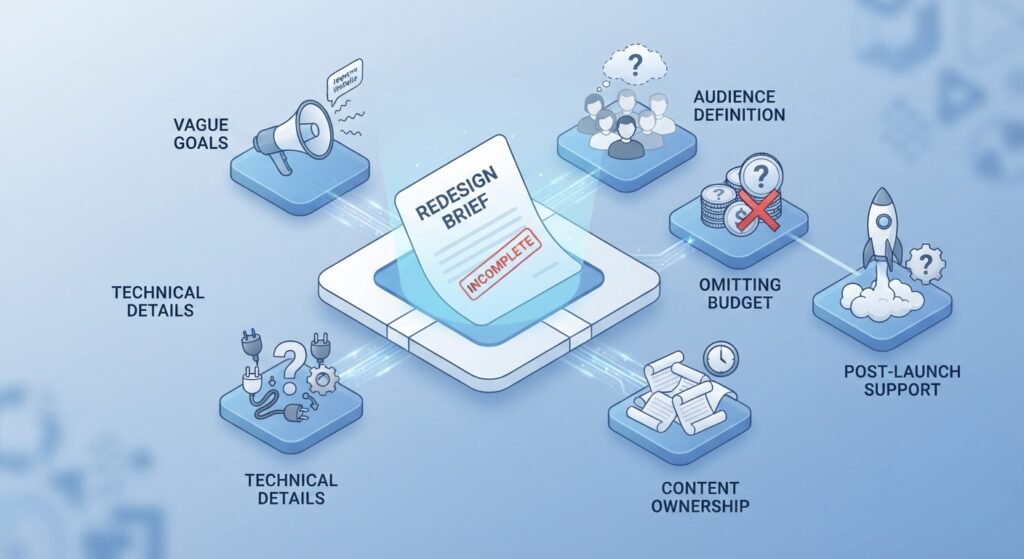
Even well-intentioned briefs can miss the mark. Here are the most common mistakes to watch for:
- Being too vague about goals “improve the website” is not a goal; “increase lead form submissions by 30%” is
- Leaving out technical details assuming the agency knows what integrations you need is risky
- Skipping the audience definition if the agency doesn’t know who you’re designing for, they can’t design effectively
- Omitting the budget this leads to proposals that are either wildly over or under what you need
- Not specifying content ownership content delays kill timelines
- Forgetting post-launch support does the agency handle ongoing maintenance? What’s the handoff process?
Final Thoughts: A Great Brief Gets You a Great Website
Writing a thorough website redesign brief takes time but it saves far more time (and money) downstream. It protects you from vague proposals, surprise costs, and the frustration of receiving something that doesn’t match your vision. It also signals to the agencies you’re evaluating that you’re a serious, organized client which often means you get better quality proposals and stronger agency interest.
Use this guide as a template. Work through each section thoughtfully, involve your key stakeholders before you send the brief out, and be as specific as possible at every step. The clearer your brief, the more closely your finished website will match your goals and the smoother the entire process will be.
If you’re still in the early stages of planning, reviewing the ultimate website redesign checklist can help you make sure you haven’t overlooked anything before the project kicks off.
Frequently Asked Questions
1. What is a website redesign brief?
A website redesign brief is a structured document that outlines your goals, requirements, scope, budget, timeline, and expectations for a redesign project.
2. What should be included in a website redesign brief?
A strong brief should include company and brand information, redesign goals, success metrics, scope of work, design preferences, technical requirements, budget, timeline, stakeholders, and content responsibilities.
3. Why are goals and success metrics important in a redesign brief?
Clear, measurable goals give the project team a way to evaluate success and prioritize design and development decisions throughout the redesign.
4. How should I communicate my design preferences in a redesign brief?
Include 3–5 inspiration websites, examples you want to avoid, brand colors, typography preferences, layout ideas, and your preferred style of imagery.
5. Why should SEO and technical requirements be included in a website redesign brief?
Including SEO, performance, accessibility, platform, and integration requirements helps prevent technical problems, ranking drops, and unexpected costs after launch.