What Is a Progressive Web App?
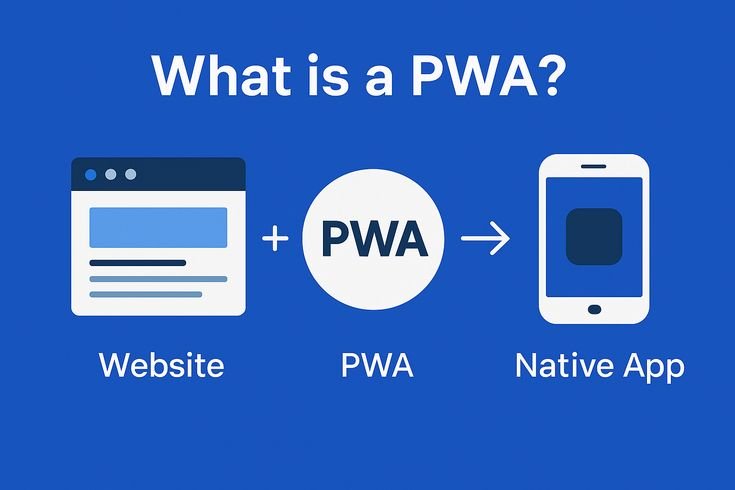
The term “Progressive Web App” gets thrown around a lot in tech circles, but its meaning is often misunderstood. A Progressive Web App (PWA) is a website built with modern web technologies that behaves like a native mobile application. It loads in a browser, but it can be installed on a user’s home screen, send push notifications, work offline, and load almost instantly all without requiring a trip to the App Store or Google Play.
In short, a PWA sits at the intersection of a website and a mobile app. It delivers the reach and accessibility of the web with the performance and engagement of a native app. And in 2026, that combination is increasingly difficult for businesses to ignore.

How Do Progressive Web Apps Actually Work?
PWAs are powered by three core technologies that make their capabilities possible:
- Service Workers: JavaScript files that run in the background, independent of the browser. They handle caching, background sync, and push notifications enabling offline functionality even when there’s no internet connection.
- Web App Manifest: A JSON file that tells the browser how to display the app when installed on a device. It controls things like the app icon, splash screen, display mode, and orientation.
- HTTPS: PWAs must be served over a secure connection. This is non-negotiable both for security and because service workers require it.
When a user visits a PWA enabled site, the browser detects the manifest file and may prompt the user to “Add to Home Screen.” From that point forward, the app behaves almost identically to a native application complete with its own icon, standalone interface, and background processing capabilities.
PWAs vs. Native Apps: What’s the Real Difference?
This is the question most business owners ask first, and rightfully so. Building a native app is expensive. It requires separate development for iOS and Android, ongoing maintenance for each platform, and you’re entirely at the mercy of app store approval processes. A PWA sidesteps all of that.
Here’s how they compare across the metrics that matter most to businesses:
- Cost: A single PWA serves all platforms. Native apps require two separate codebases (or a cross-platform framework that still adds complexity). PWAs win on cost, every time.
- Discovery: PWAs are indexed by search engines just like regular websites. Native apps live in app stores closed environments where discovery is increasingly competitive and expensive.
- Installation friction: App stores report that roughly 25% of users abandon an app download before completing it. PWAs have zero friction no account required, no large download, no waiting.
- Updates: PWAs update automatically in the background. Native apps require users to manually update, and outdated versions can cause major user experience problems.
- Device access: Native apps still have a slight edge when it comes to accessing device hardware like Bluetooth, NFC, or advanced camera APIs. But the gap has narrowed significantly in recent years.
For the vast majority of businesses particularly those focused on e-commerce, content delivery, service booking, or lead generation a PWA will match or exceed what a native app can deliver at a fraction of the cost.
The Business Case for Progressive Web Apps in 2026
The numbers behind PWA adoption are compelling. Here are some of the outcomes businesses have reported after switching to or adding a PWA:
- Twitter Lite (Twitter’s PWA) saw a 65% increase in pages per session, a 75% increase in tweets sent, and a 20% decrease in bounce rate.
- Starbucks built a PWA that is 99.84% smaller than their native iOS app, resulting in a doubling of daily active orders from desktop users.
- Pinterest’s PWA led to a 60% increase in core engagements and a 44% increase in user-generated ad revenue.
- Uber’s PWA loads in under 3 seconds on 2G networks, dramatically expanding accessibility in emerging markets.
These aren’t edge cases. They represent a pattern: when businesses invest in PWA technology, they consistently see improvements in engagement, conversion, and retention. Understanding this connection between performance and revenue is critical as we’ve covered in depth in our guide on Page Speed and Conversions: Why Every Second Costs You Money.
Key Features That Make PWAs Valuable for Business
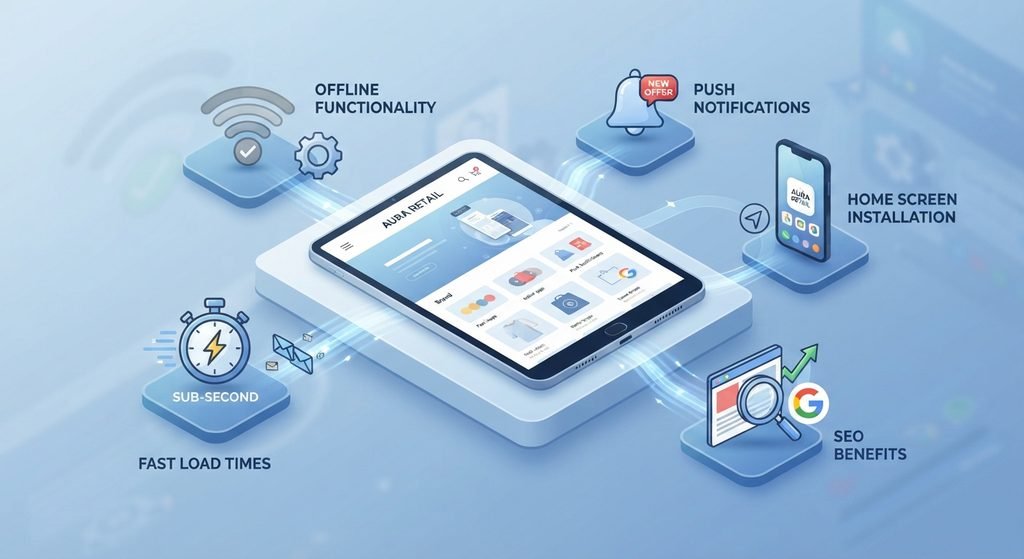
1. Offline Functionality
Service workers cache critical assets and data so users can continue browsing and even completing transactions when their connection drops. For retail, logistics, field service, or any business with users in low connectivity environments, this is a game-changer.
2. Push Notifications
Unlike email, push notifications don’t require the user to be actively browsing. You can re engage past visitors, alert customers to abandoned carts, or promote time-sensitive offers. And since PWA push notifications go through the browser rather than an app, users don’t need to download anything to receive them.
3. Home Screen Installation
When users install your PWA, it sits on their home screen alongside native apps. There’s no visual distinction. This increases brand visibility, makes re-engagement effortless, and builds habitual usage the same outcomes businesses typically spend tens of thousands of dollars trying to achieve with native apps.
4. Fast Load Times
PWAs are built with performance as a first principle. Aggressive caching, optimized asset delivery, and pre-loading combine to produce sub-second load times even on slower connections. This directly impacts conversion rates, bounce rates, and how Google evaluates your site through Core Web Vitals. If you haven’t addressed your site’s performance metrics yet, our Core Web Vitals Guide is a practical starting point.
5. SEO Benefits
Because PWAs are websites at their core, they’re fully crawlable and indexable by search engines. Unlike native apps which are invisible to Google a PWA contributes directly to your organic search presence. Combine that with the performance improvements that come with PWA architecture, and you have a compounding SEO advantage.
Who Should Consider Building a PWA?
PWAs aren’t a one-size-fits-all solution, but they’re appropriate for a wider range of businesses than most people realize. Consider a PWA if your business fits any of these profiles:
- E-commerce businesses that want app-like shopping experiences without the cost of native development
- Service businesses that rely on appointment booking, customer portals, or account management
- Media and content publishers who want to maximize engagement and reduce bounce rate
- B2B companies whose clients access internal tools on mobile devices in variable network conditions
- Local businesses that want to compete with larger brands by offering a superior mobile experience
- Startups that need to validate a product concept without the expense of a full native app build
If your current website is already performing well for lead generation but you’re losing users at the mobile experience stage, a PWA upgrade may be one of the highest-ROI investments you can make. It’s worth reviewing how your site currently performs in terms of what makes a high-converting website in 2026 before scoping your PWA project.
PWAs and WordPress: Are They Compatible?
Yes and more easily than you might expect. WordPress powers over 40% of all websites, and PWA functionality can be added to WordPress sites through dedicated plugins and custom service worker implementation. Solutions like Super PWA, PWA for WP, and custom development approaches allow WordPress sites to gain offline capabilities, push notifications, and home screen installation without a full rebuild.
That said, if your current WordPress site has significant performance issues or architectural debt, adding PWA features may not deliver the full benefit. In those cases, it’s worth weighing whether a redesign vs. rebuild makes more sense before investing in PWA technology.
What Does PWA Development Actually Involve?
For businesses unfamiliar with the technical side, here’s a practical breakdown of what building a PWA typically includes:
- Audit and planning: Reviewing your existing site’s architecture, performance baselines, and user journey to define PWA requirements.
- Service worker development: Writing and testing the background scripts that handle caching strategies, offline fallbacks, and push notification logic.
- Manifest configuration: Setting up the web app manifest with correct icons, display modes, theme colors, and start URL parameters.
- Performance optimization: Ensuring the app meets Google’s performance thresholds for PWA installability including passing Core Web Vitals benchmarks.
- Testing: Validating functionality across browsers (Chrome, Safari, Firefox, Edge) and devices, including offline behavior simulation.
- Deployment and monitoring: Releasing the PWA and establishing monitoring for service worker errors, push notification delivery rates, and performance regressions.
This is work that sits squarely at the intersection of front-end development and performance engineering not a simple plugin install. Choosing the right development partner matters. Our guide on What Web Development Really Includes in 2026 provides helpful context for understanding the scope of this kind of project.
Common Misconceptions About PWAs
Despite growing adoption, a few persistent myths continue to slow PWA investment:
- “PWAs don’t work on iOS.” This was true in 2017. In 2026, Apple supports the vast majority of PWA features through Safari including service workers, manifest installation, and push notifications (added in iOS 16.4).
- “Users won’t install a web app.” Research consistently shows that the reduced friction of PWA installation actually increases adoption compared to native apps, particularly among mobile users who are reluctant to download yet another app.
- “A PWA can’t replace a native app.” For most use cases content, commerce, booking, account management it absolutely can. The use cases where native apps maintain a clear advantage (advanced hardware access, AR/VR, complex background processing) are specific and not applicable to the majority of business applications.
The Bottom Line: PWAs Are a Competitive Advantage
Progressive Web Apps represent one of the most practical and cost-effective ways to deliver an app-quality experience to your users without the overhead of native development. They load faster, engage more effectively, rank better in search, and cost significantly less to build and maintain than their native counterparts.
As mobile usage continues to dominate web traffic and user expectations for speed and reliability continue to rise, businesses that embrace PWA technology will have a measurable advantage over those still serving slow, static mobile websites.
If you’re unsure whether your current website is even delivering the baseline experience your visitors expect, start with a thorough audit. Our Free Website Audit Guide walks you through exactly what to look for and PWA readiness is increasingly a component of that evaluation.
The technology is mature, the business case is proven, and the competitive window is still open. The question isn’t whether your business needs a PWA it’s how quickly you can get one in place.

Frequently Asked Questions
1. What is a Progressive Web App (PWA)?
A Progressive Web App is a website that uses modern web technologies to provide an app-like experience, including installation, offline functionality, push notifications, and fast loading.
2. What is the difference between a PWA and a native mobile app?
A PWA runs through the web and can work across platforms from a single codebase, while native apps are developed specifically for operating systems such as iOS and Android.
3. What are the main benefits of using a PWA for a business?
PWAs can improve loading speed, mobile engagement, accessibility, SEO, and user retention while reducing the development and maintenance costs associated with native apps.
4. Can a WordPress website be converted into a Progressive Web App?
Yes. WordPress websites can gain PWA features such as offline functionality, push notifications, and home-screen installation through plugins or custom service worker development.
5. Which businesses can benefit from a Progressive Web App?
E-commerce, service, media, B2B, local businesses, and startups can benefit from PWAs, especially when they need a fast, mobile-friendly experience without the cost of building separate native apps.